

Subscribe to our one-month free trial, without commitment!



Have you just started your free trial of AssisTime? Someone you know raved about how easy it is to use, but you don't know where to begin?
Don't panic! AssisTime is easy to use, but it still takes a little while to get familiar with it. This article is an introduction to AssisTime: it explains how to find your way around and how to adapt it to your business's operations.
Once you're logged in, you'll notice two menu elements in the header. On the right, icons give you quick access to the modules you subscribe to:

The house takes you back to your home page. Next come contacts, accounting, inventory, calendar, projects and newsletters (depending on your modules). The question mark opens the help, the gear opens the Settings page, and the last icon logs you out.
On the left, the three-line icon opens the full AssisTime menu, organized by module:
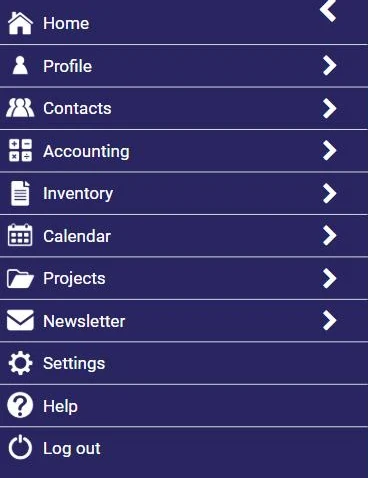
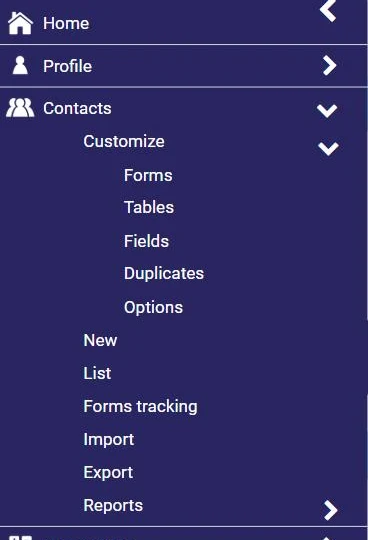
In each module, the first submenu is called Customize: it groups the settings that adapt AssisTime to your business. For example, for contacts:
For an overview, click the gear in the header (or Settings in the menu). This page groups all the settings, module by module:
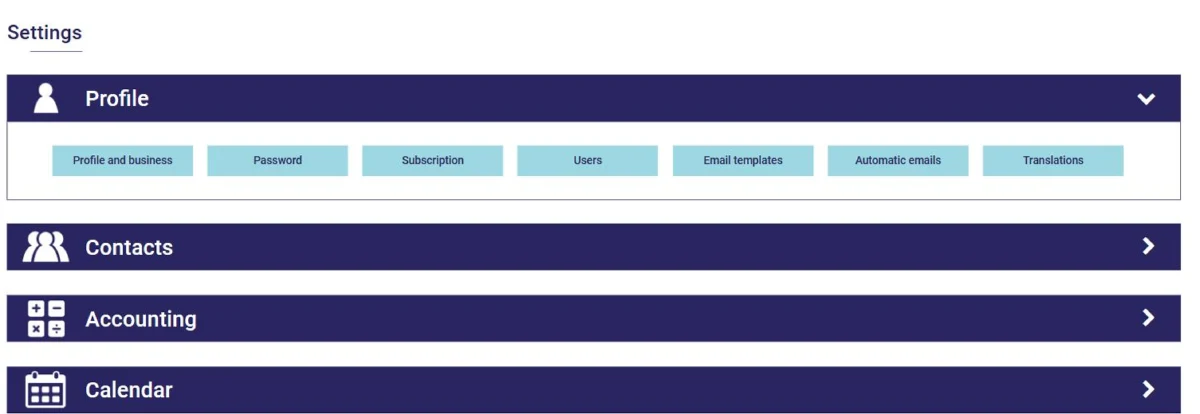
Start with Profile, Profile and business: your contact details and logo will appear on your invoices and on your online appointment booking portal. This is also where you set up your taxes, your business's legal structure, your fiscal year-end and the number of your next invoice (see this article).
If you're a member of a professional order or association, you can enter its name, its logo, your member number and your signature: they'll appear on your professional receipts and on the forms you sign.
The Profile menu also gives you access to your subscription (see this article), the users in your group (see this article), your email templates and your automatic emails.
Under Calendar, Customize, you manage your calendars, your appointment locations and types, appointment statuses, group class types, the online appointment booking portal and its emails (see this article), as well as your calendar's display options.
Under Accounting, Customize:
Under Projects, Customize, you manage your resources (staff and equipment, with their costs and schedules), the statuses of your projects and tasks, statutory holidays, and the types of actions you and your employees can check when logging your time.
The Inventory and Newsletter modules have their own settings too: your inventory locations, and the sending domain for your newsletters.
On many screens, a question mark next to a field explains what it's for. And our blog is full of tutorials for each module!
As you can see, AssisTime is packed with features. Take the time to set it up properly to get the most out of it!
Subscribe to our one-month free trial, without commitment!
You will be charmed by the interface and the ease of use!
