AssisTime is ideal for the individual user as well as for those working with several colleagues.
If your user group is large enough, you will receive an additional discount on your subscription!

See every lead at a glance, where it stands and what to do next, all the way to the accepted quote.
14-day free trial · No commitment · Support in English and French

A request comes in through your website, a quote goes out, then nothing: nobody followed up, and the client signed elsewhere. With leads scattered across emails, texts and everyone's memory, sales slip away without anyone noticing. The AssisTime sales pipeline tracks every opportunity, from the first request to the accepted quote.
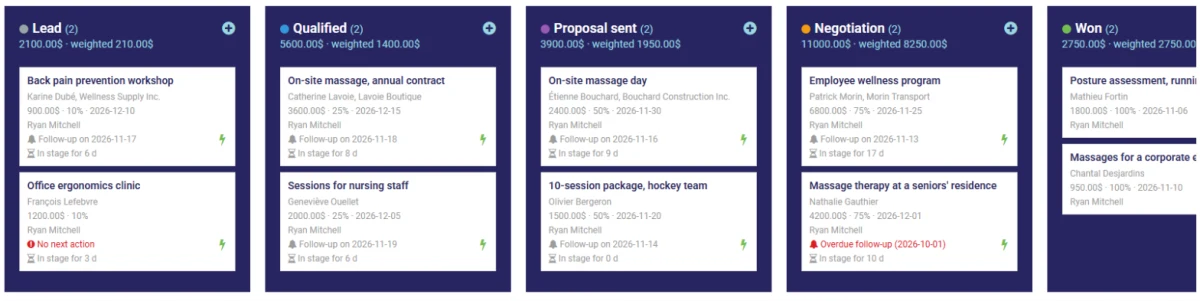
Each sales opportunity is a card, with its amount, owner and expected close date. Drag it from one stage to the next: Lead, Qualified, Proposal sent, Negotiation, Won or Lost. Stages can be renamed and reordered as you like, and the view adapts to your phone.
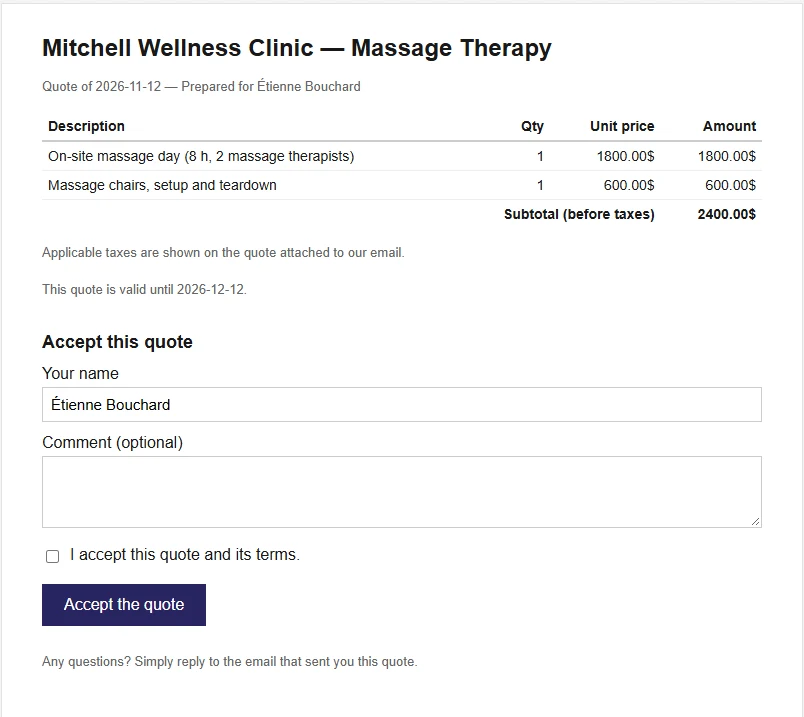
Send the quote by email with an "Accept the quote" button. You are notified as soon as the client opens it, then when they accept it: the opportunity moves to Won on its own. Offer several options in the same quote, and ask for a deposit payable online upon acceptance. Each quote has its own expiry date, 30 days by default: after that, it can no longer be accepted online. See invoicing
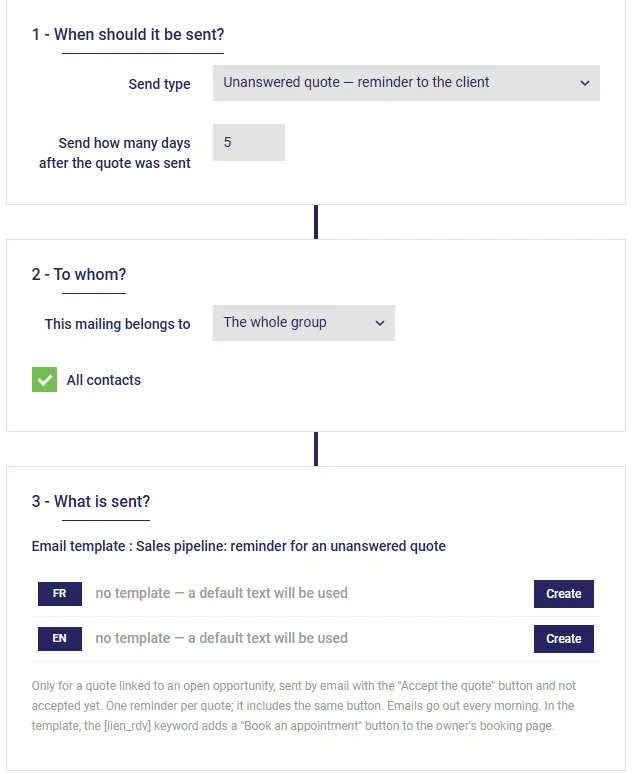
A quote with no reply? A reminder goes out to the client after the delay you choose. An opportunity that stalls is flagged, each card shows its next action, and a lost opportunity can come back on its own a few months later, depending on why it was lost.
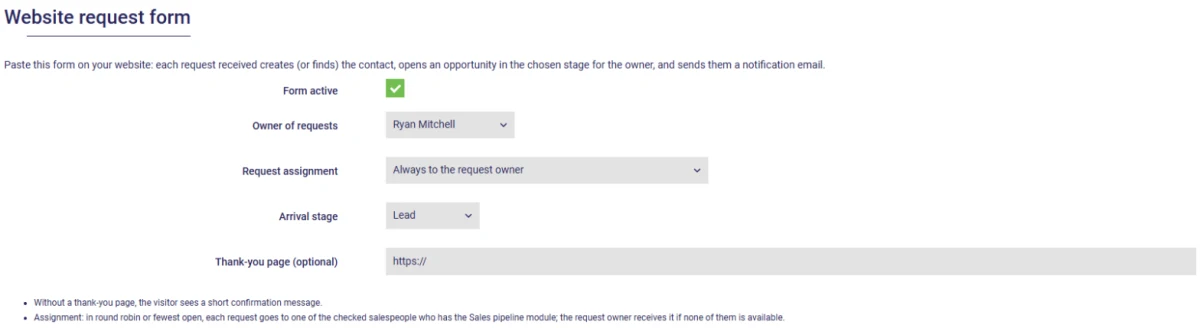
Add a request form to your website: each request creates the contact and the opportunity, assigned to your sales reps in turn or based on their workload. An appointment booked online can also open an opportunity, and your existing lists can be imported from a CSV file.
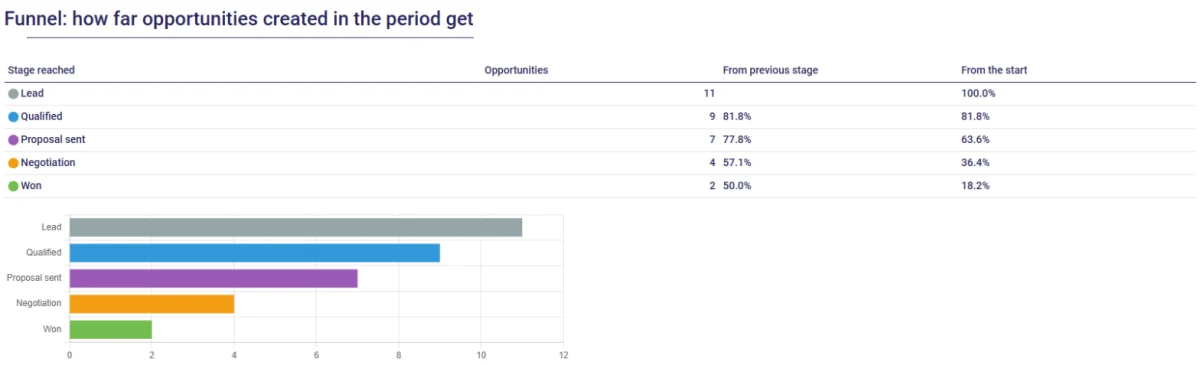
The report shows your conversion rate, your funnel stage by stage, your sales by source and the weighted amount to come. Every Monday, the manager receives an email summary: opportunities won, lost, new and pending, by sales rep, with their targets.
The Sales pipeline module is added to your plan for $3 per month (plus taxes, 12-month commitment). Quotes and online deposits use the Accounting and Invoicing module.
It is the path a lead follows, from the first request to the sale: lead, qualified, proposal sent, negotiation, then won or lost. Seeing it in columns tells you where each opportunity stands and which one to follow up.
$3 per month, plus taxes, added to your plan. Quotes, online acceptance and deposits also use the Accounting and Invoicing module.
Yes. The quote email includes an "Accept the quote" button. You are notified when it is opened and when it is accepted, and the opportunity moves to Won. If you wish, a deposit invoice is created and payable online at the time of acceptance.
30 days by default. You can change this duration in the pipeline settings, or set a specific date for one quote. The expiry date is shown on the PDF; once it has passed, the client can no longer accept the quote online and the automatic reminder no longer goes out. Choose 0 for quotes that never expire.
Yes. With automatic emails, a reminder goes out to the client the number of days you choose after the quote is sent, once per quote.
Each sales rep moves their own opportunities; the administrator sees and manages them all. The report and the Monday summary can be filtered by sales rep.
Yes, from a CSV file: title, stage, amount, expected close date, source, owner and contact details. Opportunities are created all at once, with their contact; a line without a recognized stage goes to the stage of your choice.
AssisTime is ideal for the individual user as well as for those working with several colleagues.
If your user group is large enough, you will receive an additional discount on your subscription!
Check the modules you want: $3 each
Running a spa or a clinic with several massage therapists? One price per room, with unlimited employees.
Contacts, calendar, online booking, invoicing and accounting included
Referral program also available!
Prices for a 12-month commitment. Monthly payments also available (additional fee of $1 + tax per month).
Gather all your customers' information in one place!
Learn more


Create your invoices, enter your expenses, generate your reports in just a few clicks!
Learn more