

Subscribe to our one-month free trial, without commitment!



You've tried AssisTime and now you want to subscribe?
We're delighted to count you among AssisTime users! Here's how to complete your subscription.
Open the main menu (the three-line icon at the top left), then go to Profile, Subscription. There you'll find the services you're subscribed to, with their expiry date, as well as your past invoices:
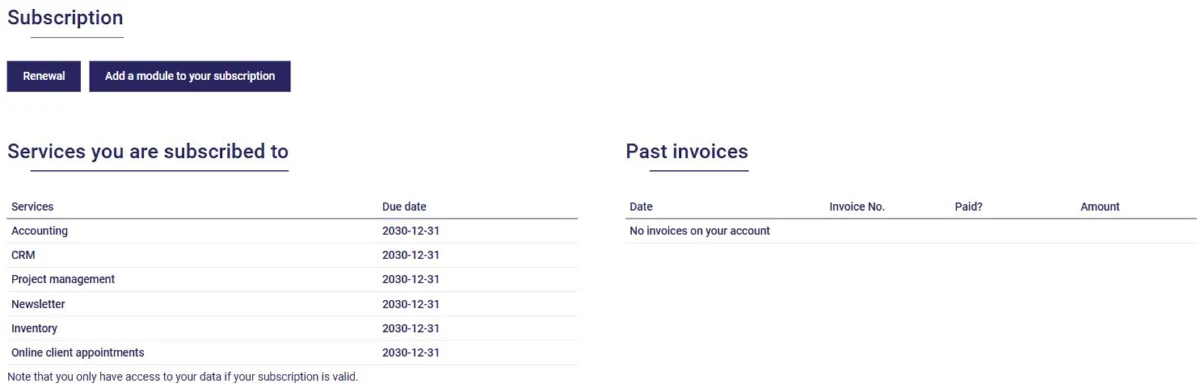
Note that you have access to your data as long as your subscription is valid.
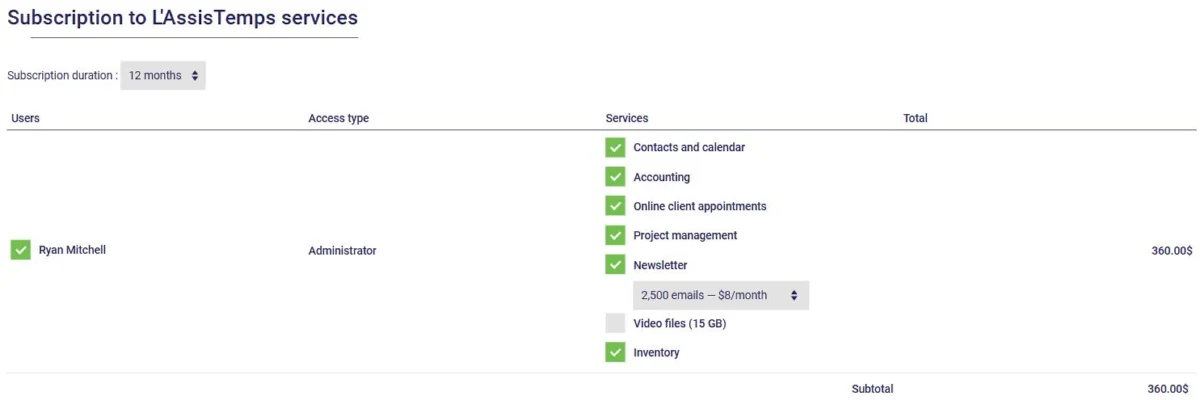
Click Renewal. First choose the term of your subscription (12 months or 1 month), then check the services you want: contacts and calendar, accounting, online appointment booking, project management, newsletter (with the email package that suits you), video files and inventory. The total, taxes included, is calculated as you go:
Working as a team? The Add button, below the table, lets you add users to your group and choose their services (see this article).
Already subscribed, but want one more module? Use the Add a module to your subscription button on the Subscription page instead.
Next, enter your credit card information and click Complete. Payment is secured by the Stripe platform. Your subscription is activated right away, and your invoice is added to the Past invoices section of the Subscription page.
When you subscribe, enter the email address of the person who suggested AssisTime to you: they can get a free month as a thank-you!
And you can benefit too: under Referrals, on the Subscription page, the Refer a friend button gives you your personal referral link. You'll get a free month of all your services for every friend who subscribes to AssisTime after their free trial. To be eligible for the referral program, you must commit for 12 months.
Thank you for your trust, and welcome aboard!
Subscribe to our one-month free trial, without commitment!
You will be charmed by the interface and the ease of use!
