

Subscribe to our one-month free trial, without commitment!



Did you know that AssisTime can be used as a team?
Professionals working under the same clinic can share their contacts and calendars to make day-to-day operations easier. Your employees can also have access to some AssisTime features.
This article explains how to use AssisTime as a team.
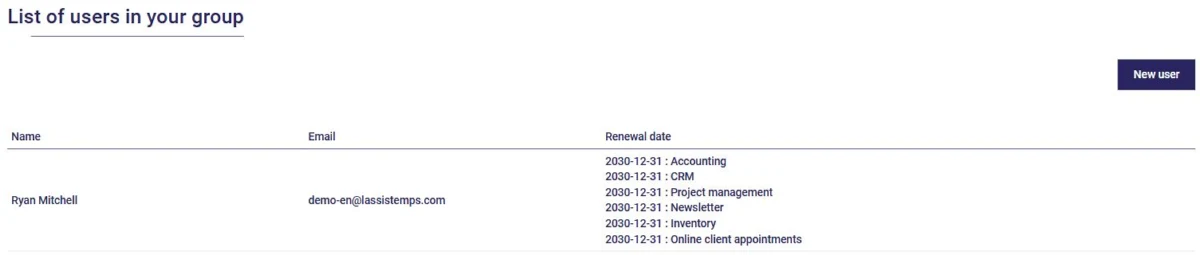
When you sign up for AssisTime, you're the only one in your group. To add members, open the main menu (the three-line icon at the top left), then go to Profile, Users. There you'll see the list of users in your group and the renewal date of their services:
Click New user, then enter the person's contact details. Their email address is what they'll use to log in to AssisTime. Then choose:
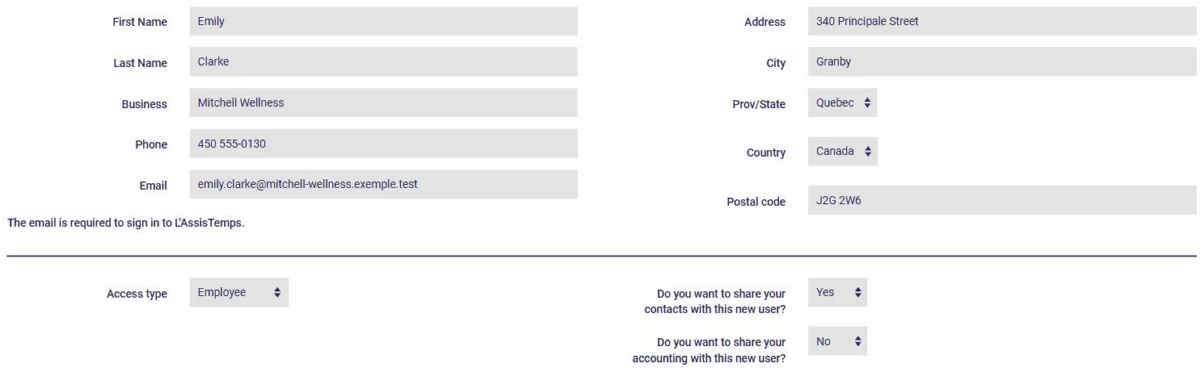
Note that sharing accounting generally applies to members of the same business.
To share your calendar or keep it private, go to Calendar, Customize, Calendars, click your calendar and indicate whether or not it is confidential.
Employee access costs 50% less than administrator access, and group discounts apply from 5 users. See our pricing for all the details.
It's common for several professionals to work under the same business name. In that case, it makes sense for them to be part of the same group in AssisTime.
That way, if a client sees more than one professional at the clinic, their record follows them. Group members can also view their colleagues' calendars and add appointments to them when needed: the Calendar, Calendars, All staff menu displays the whole team's calendars.
Each professional can also be offered on your online appointment booking portal, so your clients can choose who they book with (see this article).
If you have employees, for example at the front desk, give them employee access. They'll be able to book appointments, create and view client records, fill out forms and, if you allow it, create invoices.
Management functions, such as accounting settings, the general ledger and financial reports, remain reserved for administrators.
If your business is incorporated, create administrator access for your partners: they'll have access to all of the business's information, in one place. You can also create access for the business's employees.
AssisTime is flexible enough to be used on your own or as a team, with whatever structure best fits your business!
Subscribe to our one-month free trial, without commitment!
You will be charmed by the interface and the ease of use!
