A no-show doesn't only cost the price of the appointment: the slot was reserved, often turned down for another client, and you still have to call back and reschedule. The calculation below only counts the visible part.
No-shows per month × 12 × average appointment price
Example: 2 × 12 × $95 = $2,280 per year
Lost revenue × share of no-shows avoided by reminders or filled from the waiting list
Example: $2,280 × 30% = $684 per year
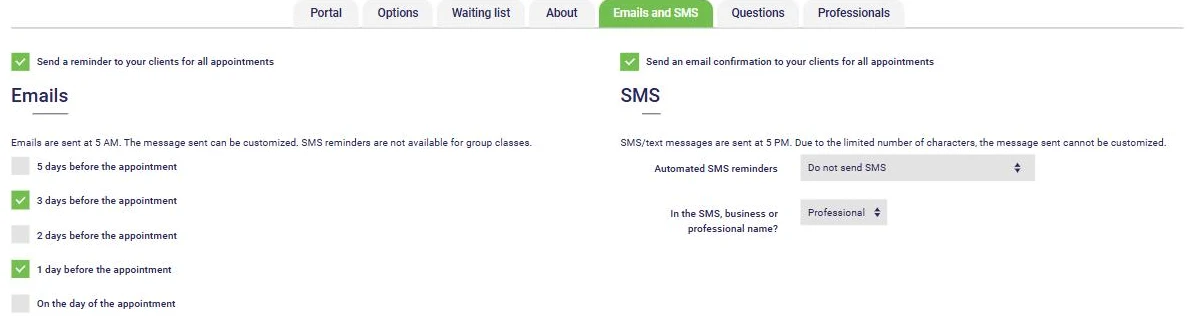
With AssisTime, your clients get an email and text message reminder before each appointment, at the times you choose. They can cancel online according to the rules you set, and the freed-up slot is offered to the clients on your waiting list.
Multiply your number of no-shows per month by 12, then by the average price of an appointment. Two no-shows a month at $95 add up to $2,280 in lost revenue per year, not counting the time spent calling back and rescheduling.
Send email and text message reminders, ask clients to confirm they are coming, make cancelling easy, post a clear cancellation policy and offer freed-up time slots to a waiting list. Most no-shows come from forgetting or last-minute surprises, not bad faith.
Yes, if your cancellation policy is announced in advance and the client accepted it when booking. If you belong to a professional order, also check its rules. A no-show fee makes up for part of the loss, but the time slot stays empty: it is better to avoid the no-show.
The share of no-shows you expect to avoid with reminders, or to fill by offering the freed-up slot to another client. Results vary from one clientele to another: start with a cautious assumption, then compare with your own numbers after a few months.
Yes. AssisTime sends email and text message reminders before each appointment, at the times you choose, and can offer a cancelled time slot to the clients on your waiting list.
Gather all your customers' information in one place!
Learn more


Create your invoices, enter your expenses, generate your reports in just a few clicks!
Learn more