In Quebec, the GST (federal tax) is 5% and the QST (provincial tax) is 9.975%. Both are calculated on the pre-tax amount, then each is rounded to the cent.
GST = amount × 0.05
QST = amount × 0.09975
Total = amount + GST + QST
Example: $80 + $4.00 + $7.98 = $91.98
Pre-tax amount = total ÷ 1.14975
then GST and QST calculated on that amount
Example: $91.98 ÷ 1.14975 = $80.00
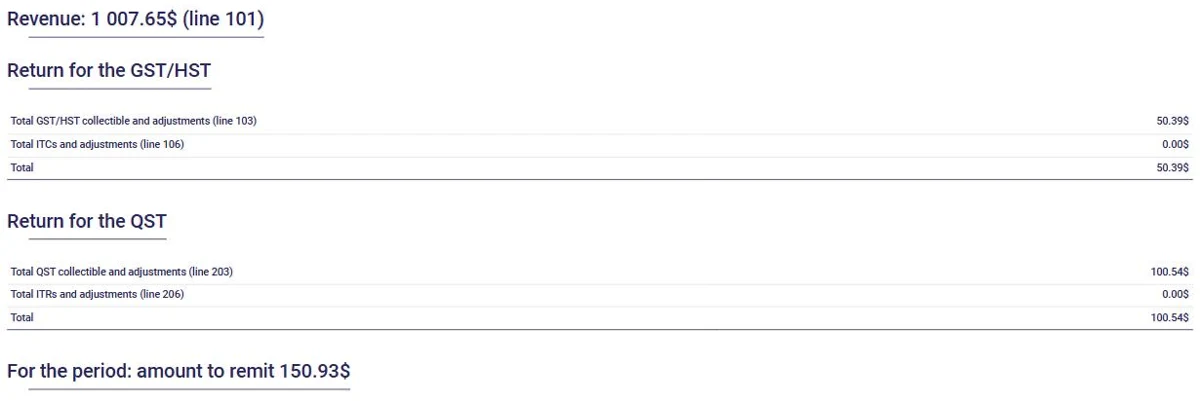
With AssisTime, the GST and QST are added to every invoice along with your registration numbers, even when your prices are shown with taxes included. At the end of the quarter, your sales tax report is ready to file, using the regular or the quick method.
Multiply the pre-tax amount by 5% for the GST and by 9.975% for the QST, round each tax to the cent, then add everything up. For $100: $5.00 of GST and $9.98 of QST, for a total of $114.98.
Divide the total by 1.14975 to get the pre-tax amount, then calculate each tax on that amount. For $114.98: $100.00 before taxes. The calculator checks that the sum gives back your exact total.
No. Since January 1, 2013, the QST is calculated on the pre-tax amount, like the GST. The combined rate is therefore 14.975%.
Because each tax is rounded to the cent, some totals match no pre-tax price. For example, no price gives exactly $20.00 with taxes included: $17.39 gives $19.99 and $17.40 gives $20.01. The calculator then shows the closest price and the one-cent difference.
If your taxable sales exceed $30,000 in a calendar quarter or over four consecutive calendar quarters, you must register for the GST and QST and collect the taxes. Below that threshold, you are a small supplier and registration is optional. Some services, including many health services, are exempt: check your situation with Revenu Québec.
Your GST and QST registration numbers, the pre-tax amount and the amount of each tax. AssisTime adds them to every invoice automatically and includes them in your sales tax report.
Gather all your customers' information in one place!
Learn more


Create your invoices, enter your expenses, generate your reports in just a few clicks!
Learn more