

Subscribe to our one-month free trial, without commitment!



Has your accountant ever mentioned the quick method of accounting for GST and QST? If you're eligible, it can simplify your tax returns: instead of calculating the taxes you collected minus your input tax credits, you remit a fixed percentage of your taxable sales. Good news: this method is built into AssisTime!
To find out whether you qualify and which rate applies to your business, see this Revenu Québec page or talk to your accountant.
Open the main menu (the three-line icon at the top left), then go to Profile, Profile and business. You can also get there through Accounting, Taxes, Settings.
In the Taxes section, choose your Calculation method:
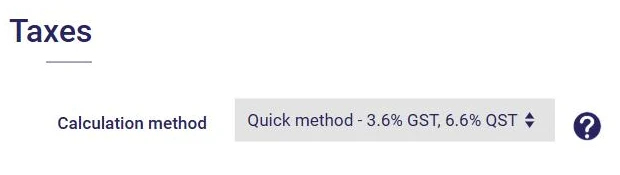
The choice is made for each ledger. Since the quick method is specific to Revenu Québec, the selector only appears for a business located in Quebec. Don't forget to click Save.
That's it! Your tax report (Accounting, Taxes, Report) is now calculated using the quick method. It shows your taxable sales for the period, the applicable rate, the 1% credit on the first portion of your taxable sales and the amount of tax to remit:
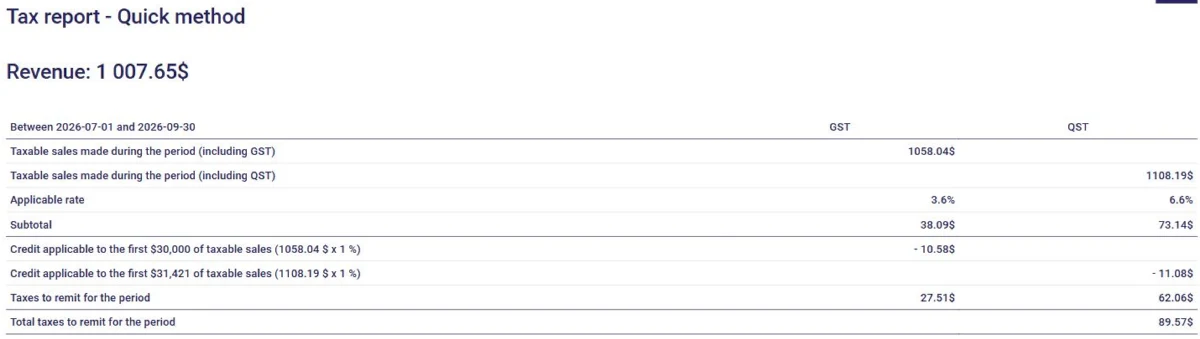
The chosen method is also taken into account in your income statement. To learn more about managing taxes, read the article Manage Your Taxes in AssisTime in 5 Easy Steps.
Subscribe to our one-month free trial, without commitment!
You will be charmed by the interface and the ease of use!
