

Subscribe to our one-month free trial, without commitment!



Would you like to set aside certain time slots on your online appointment booking portal for your best clients? For example, keeping your Friday late afternoons for VIP clients only?
You can do that with AssisTime! This article shows you how.
Start by adding a contact type (a tag) to your VIP clients. Open the client record and, on the contact's record, add the VIP type in the Types section.
Have several clients to identify? In your contact list, click Select multiple contacts, check your VIP clients, choose Add a tag, enter VIP and click Confirm. To learn more about contact types, read the article Why Use a CRM?.
Next, go to Calendar, My availability, and click in the calendar to add an availability (or click an existing availability to edit it).
In the Client types section, the All client types box is checked by default. Uncheck it and the list of your contact types appears. Check VIP:
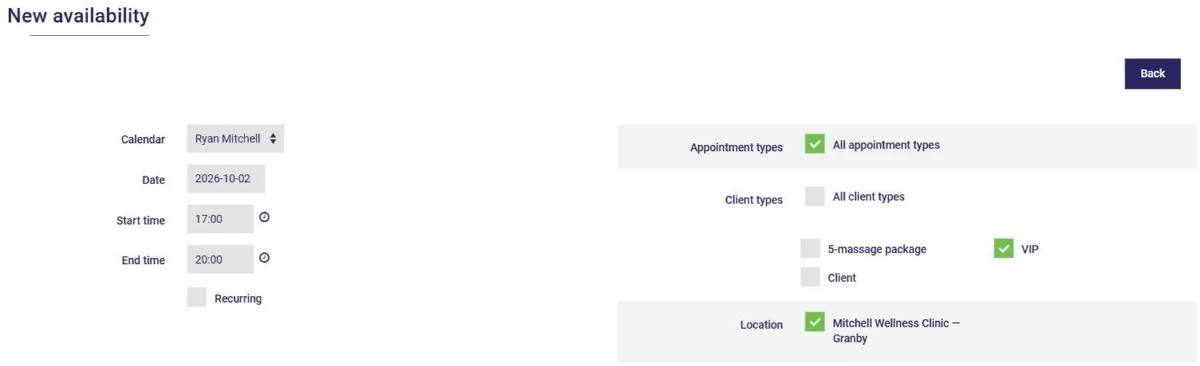
As usual, also choose the appointment types and locations offered in this time slot, then click Save this availability. Check Recurring to repeat the time slot every week.
Note that any new contact type you create in your client records is automatically added to this list.
On your portal, clients identify themselves with their email address when they book. Only clients tagged VIP in your CRM will see this time slot; for everyone else, including new clients, it simply doesn't show up.
You can use the same approach for other groups: clients with a package, employees of a partner company, and so on. To set up your portal, read the article Let AssisTime Book Your Appointments!.
Pamper your VIP clients by saving your best time slots for them!
Subscribe to our one-month free trial, without commitment!
You will be charmed by the interface and the ease of use!
