

Subscribe to our one-month free trial, without commitment!



Do you need a tool to make it easier for your clients to book appointments with you? Here's a solution from AssisTime: links that apply a filter to your online appointment booking portal based on the type or location of the appointment. You can access these links from your AssisTime account.
Don't have an online appointment booking portal yet, or would you like to improve it? Here's an article that could help:Let AssisTime Book Your Appointments!
To access the links, log in to your AssisTime account and click the Online appointments button below your calendar.
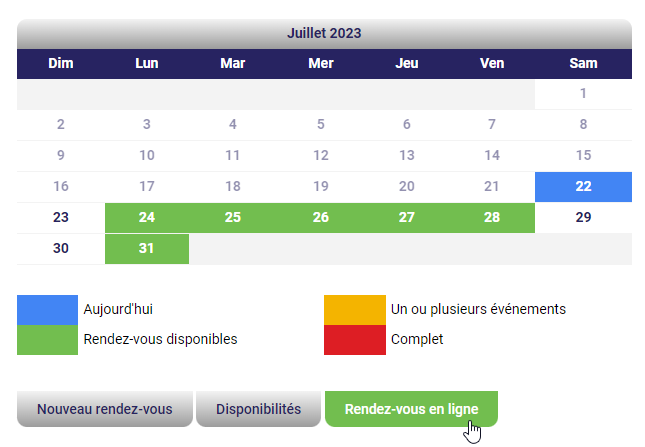
And there you have it: in front of you are links to your appointment booking portal, sorted by appointment type and location.
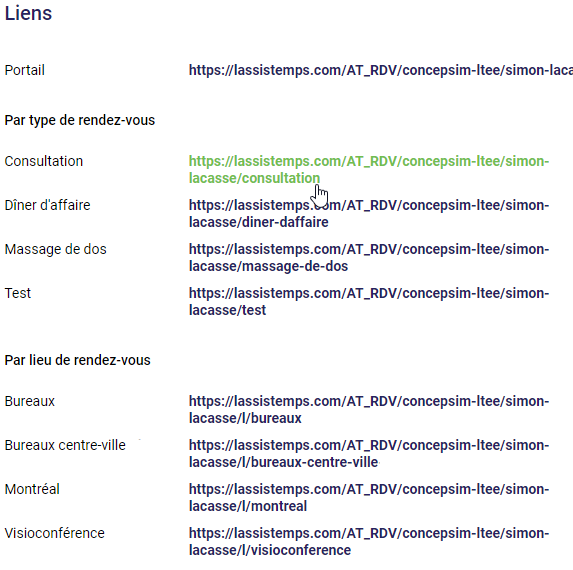
You can reach your online appointment booking portal through these links, and AssisTime will apply a search filter based on the link selected.
There are many ways to use the links to your online appointment booking portal provided by AssisTime. Here are a few examples that might help:
On your website, use the links to direct your clients so they can book an appointment with you for a specific appointment type or location.
On social media, send a link to a contact to make it easier for them to book an appointment with you.
And there you go: you now have one more tool at hand to save you precious time!
Subscribe to our one-month free trial, without commitment!
You will be charmed by the interface and the ease of use!
