

Subscribe to our 14-day free trial, without commitment!



You became self-employed to practise your profession: to massage, treat, coach, create. Not to spend your evenings copying appointments into Excel, writing invoices in Word and hunting for a client's receipt in your inbox.
Yet admin eats into every week. The problem is that we rarely measure it: it slips in between two clients, in the evening, on Sunday. Take five minutes to do the exercise below. The result might surprise you.
Grab a sheet of paper or a note on your phone. For each task, estimate how much time you spend on it in a typical week. Be honest: count the small interruptions too.
Add it all up. Then multiply the total by your hourly rate: that's the value of the time you don't bill.
A fictional example, to illustrate: a kinesiologist who sees 20 clients a week estimates 1 h 30 min for appointments, 45 minutes for reminders, 1 hour for invoices and receipts, 1 hour for bookkeeping and 30 minutes for follow-ups. Total: 4 h 45 min a week. Over 46 working weeks, that's close to 220 hours a year, or more than five full-time work weeks. Your own result will be different, but do the math: it's often more than you think.
It's not that each task is long. It's that you're juggling several tools that don't talk to each other. The appointment is in your phone's calendar, the invoice in Word, payment tracking in Excel, the receipt in yet another file. The same information (client name, date, service, price) gets retyped three or four times. Each time, it takes time, and it's a chance to make a mistake.
That's exactly what AssisTime does. It was designed in Quebec for self-employed professionals. Let's go back to the tasks in the exercise:
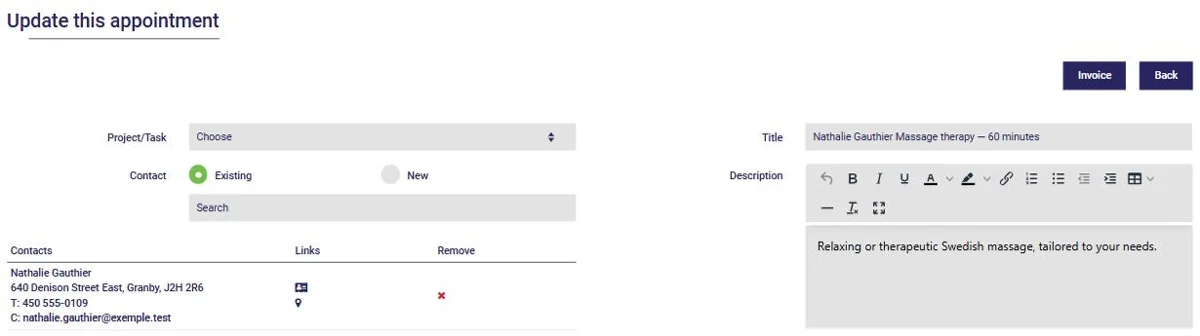
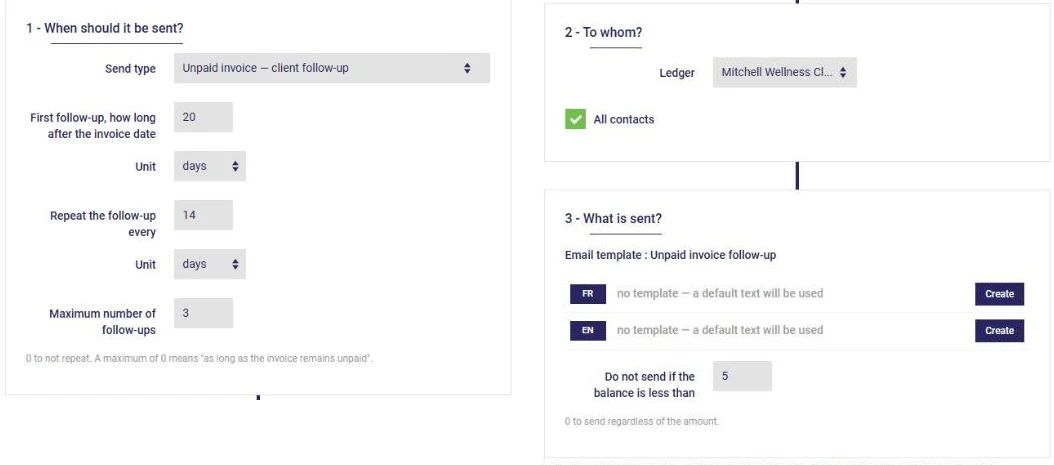
And if you've set up online payments, your client can pay their invoice by credit card, straight from the email that sends it.
How long does it take to get started?
The longest part is setting up your services, prices and taxes once. After that, every appointment saves you time. Start with one piece, such as online booking, then add invoicing.
Isn't a well-built Excel file enough?
To get started, yes. But Excel doesn't know that an appointment took place, that an invoice is unpaid or that a receipt still needs to be issued: you have to remember and copy everything over yourself. The more your client base grows, the heavier that manual tracking becomes, and the more costly the oversights. A connected tool makes those links for you.
Will my accountant still have a role?
Yes. Your accountant remains your best ally for tax returns and advice. The difference: you hand over clean, up-to-date data instead of a box of paper.
What if I only see a few clients a week?
Redo the exercise with your own numbers. Even one hour saved per week adds up, over a year, to several days of work or rest.
See how AssisTime simplifies daily life for self-employed professionals, from booking to bookkeeping. Try AssisTime for free, then redo the exercise in a month.
Subscribe to our 14-day free trial, without commitment!
You will be charmed by the interface and the ease of use!