

Subscribe to our 14-day free trial, without commitment!



Three weeks after her appointment, your client emails you: her insurer rejected her claim. Your member number wasn't on the receipt. You redo the document, she resubmits, and everyone has lost time. It happens all the time, and it can almost always be avoided.
Here is what an insurance receipt usually needs to include, the mistakes that most often lead to a rejected claim, and a simple way to produce a complete receipt every time.
Insurance plans reimburse care provided by recognized professionals: massage therapists, osteopaths, psychotherapists, counselling therapists, naturopaths, kinesiologists… To check this, the insurer relies on the receipt. It looks for who provided the care, whether that person belongs to a recognized association or regulatory body, and what was actually paid. If something is missing, the claim comes back.
Every insurer and every association has its own requirements, and they change over time. The items below are the ones that come up most often. Always check with your association or regulatory body what applies to your profession.
A receipt or invoice number isn't always required, but it makes life much easier when your client or the insurer has a question months later.
To make sure nothing is missing, try our free insurance receipt template: it checks off each item as you fill it in, and prints to PDF.
Yes. An insurer may ask you to confirm a treatment long after the fact, and your client may lose the receipt. Your receipts are also part of your business records: the Canada Revenue Agency generally requires you to keep your records for six years from the end of the tax year they relate to. Your regulatory body may also have its own record-keeping rules. (General information only; check with your accountant or association.)
The easiest approach is never having to search: a receipt produced by software, linked to the invoice and the client's record, can be found in seconds. For a refresher on what a receipt should contain in general, see our article How to create a professional receipt.
In AssisTime, the insurance receipt is called the professional fee receipt. It is produced from the invoice, and you only enter your information once.
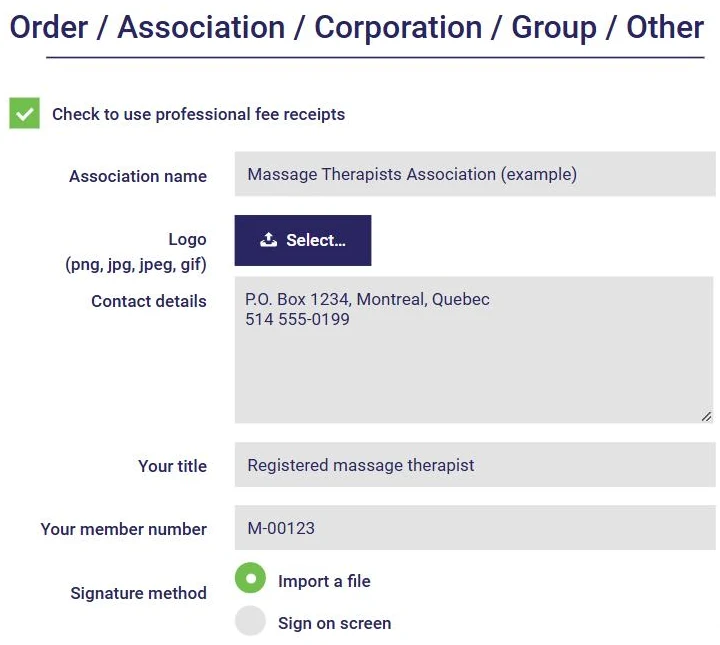
1. Your professional profile. In Profile > Profile and business, in the Order / Association / Corporation / Group / Other section, check the box to use professional fee receipts. Then enter your association's name, logo and contact details, your title and your member number. For your signature, upload an image or sign right on the screen.
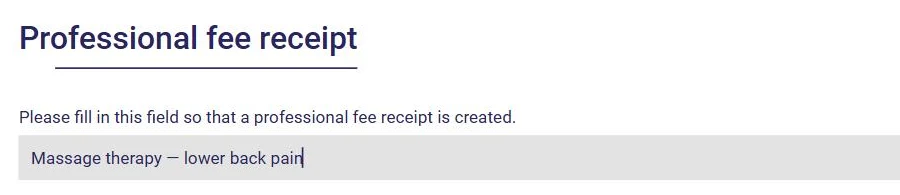
2. The reason, on the invoice. Once the option is on, every invoice shows a Professional fee receipt field. Enter the reason for the visit and the receipt is created. This reason is stored encrypted in your workspace.
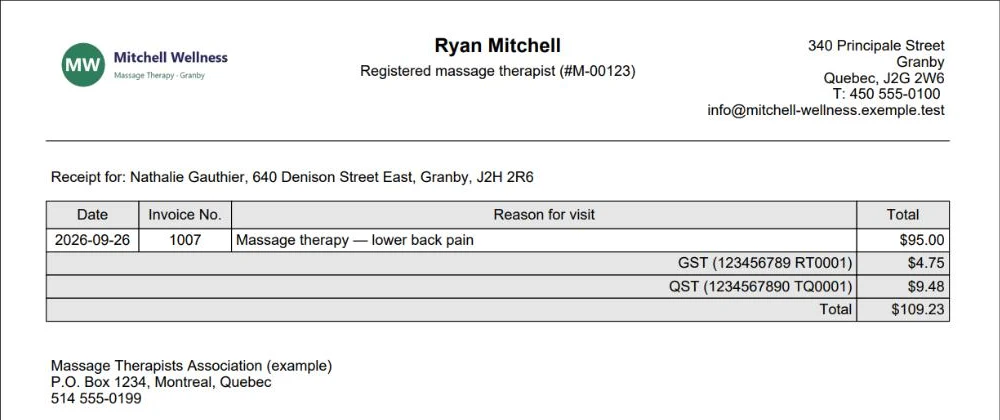
3. The PDF receipt. A Receipt button is added to the invoice: open the PDF or email it to your client. The receipt shows your name, title and member number, your contact details, the client's name and address, the date, the invoice number, the reason for the visit, the amount with taxes and their registration numbers, your association and your signature. Once the invoice is paid, the word "Paid" is added (an option lets you turn this off).
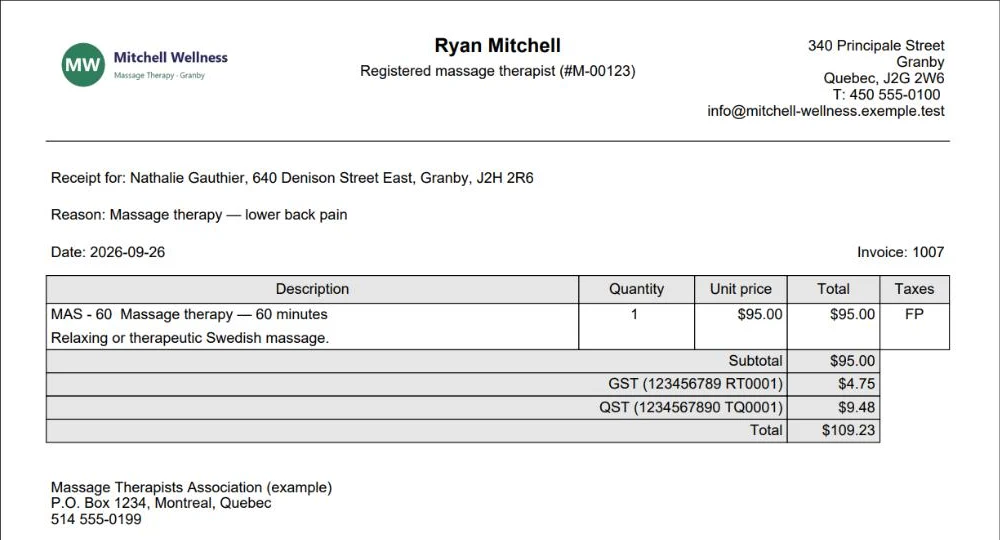
Prefer a receipt that lists every service billed, with its quantity and price? Check the Detailed receipt option in your profile.
Several practitioners in one clinic? The Signature on receipt option lets you choose the administrator's signature or the signature of the person who made the sale. And if you use the Customer Area, your clients can find their receipts there on their own.
My client lost their receipt. What should I do?
Open the invoice and email the receipt again: it is produced from the invoice each time.
Can I issue a single receipt for several sessions?
Some insurers accept it if the date of each session is shown, others don't. One receipt per session is the safest choice; check with your association.
My member number changed. What should I do?
Update your profile right away: the receipts you produce afterwards will show the new number.
AssisTime is built for professionals whose clients claim their treatments from insurance: see how it helps massage therapists, osteopaths, counselling therapists and psychotherapists. Not a client yet? Try AssisTime for free.
Subscribe to our 14-day free trial, without commitment!
You will be charmed by the interface and the ease of use!