

Subscribe to our one-month free trial, without commitment!



Have you had a large clientele for a long time? Are you worried that entering all your contacts in AssisTime will be a huge job?
Good news: AssisTime has tools to import your contacts in just a few clicks!
In this article, you'll see how to use the contact import tools.
Open the main menu (the three-line icon at the top left), then go to Contacts, Import:
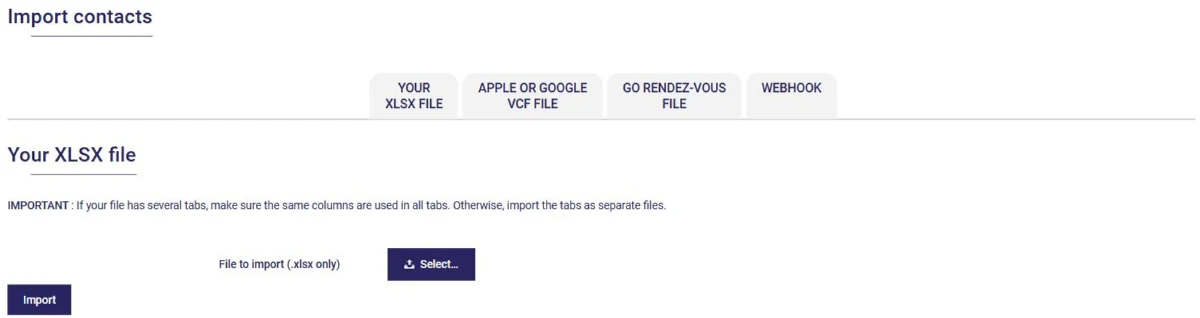
You have four ways to import your contacts, one per tab:
Are your contacts in an Excel file? Select it in the Your XLSX file tab and click Import. The first row of the file must contain the heading of each column (First name, Last name, Email…).
AssisTime then reads your column headings and suggests the matching field for each one:
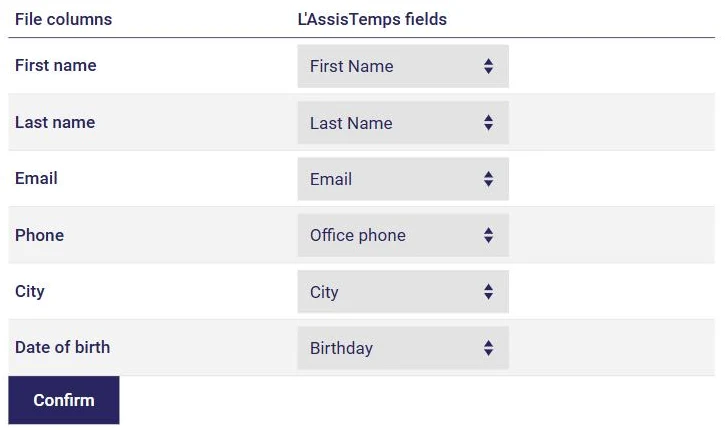
Check the matches and correct them if needed. For a column that has no equivalent, choose Create a special field to keep it in a custom field, or Do not import to skip it. Then click Confirm: your contacts are added to your list within seconds.
If your file has several sheets, make sure they all use the same columns, or import them separately.
Do you use Outlook, Gmail, Yahoo or another email program? Most of them let you export your contacts to a file. Choose the Excel (XLSX) format, or export to CSV and save the file as XLSX with Excel, LibreOffice or Google Sheets before importing it.
For the contacts on your iPhone or in your Google account, export them in vCard format (.vcf) and use the Apple or Google VCF file tab. Contacts already in your account won't be duplicated.
Using software that isn't on the list? Export your clients to Excel and use the Your XLSX file tab: the column matching adapts to your file. And if you need help, we can guide you through the transfer.
Don't hesitate to contact us for help importing your contacts into AssisTime. We can also help you import your appointments.
Once your contacts are imported, remember to categorize them with contact types (see this article).
Subscribe to our one-month free trial, without commitment!
You will be charmed by the interface and the ease of use!
