Want to know where you stand in your fiscal year without spending hours on it?
AssisTime has the tools you need!
Whether you're self-employed or an incorporated business, you'll find the reports you need in AssisTime. Open the main menu (the three-line icon at the top left), then go to Accounting, Reports:
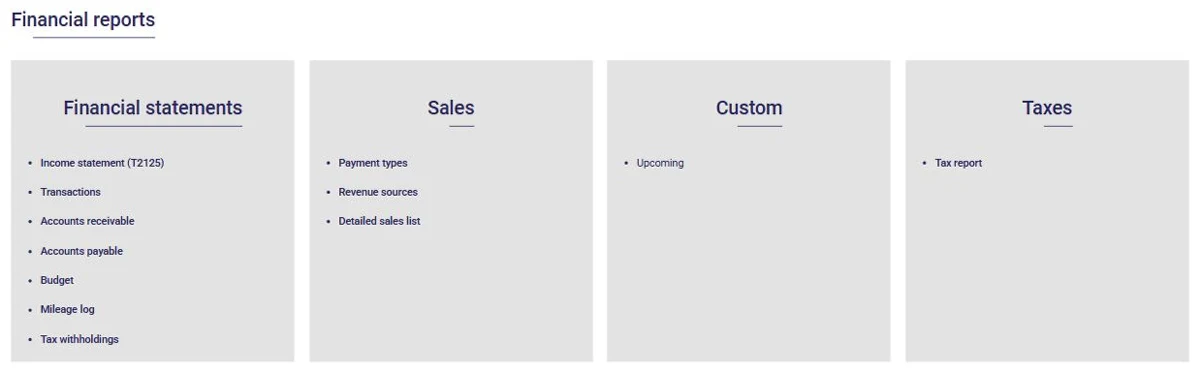
The reports are grouped into four sections: Financial statements, Sales, Custom and, if you collect taxes, Taxes. This article explains what each one is for.
Note that to get accurate reports, you must have entered your sales, expenses and other financial transactions for the period in question.
Financial statements, based on your legal form
The financial statements available depend on the legal form chosen in your profile: Self-employed, Self-employed with balance sheet or Incorporated business.
For everyone:
- Income statement: your revenue, your total expenses by category and your bottom line (profit or loss). For the self-employed, it's called Income statement (T2125), after the federal form it helps you fill out for your income tax return.
- Transactions: the details of your transactions, account by account.
- Accounts receivable: as of a given date, the amounts your clients owe you, invoice by invoice.
- Accounts payable: as of a given date, the expenses you haven't paid yet.
- Budget: enter your planned amounts by revenue and expense category and compare them with your actual amounts; the difference is calculated for you.
For the self-employed:
- Mileage log: the total of your business travel, by month.
- Tax withholdings (in Quebec): based on your income statement, an estimate of the income tax and contributions (QPP, QPIP) you'll have to pay when you file your income tax return. That way, you know how much to set aside.
- Balance sheet: if you chose the Self-employed with balance sheet form, your assets, fixed assets and liabilities as of the chosen date.
For incorporated businesses:
- Balance sheet: your assets, fixed assets, liabilities and equity as of the chosen date.
- Trial balance: the balance of each of your accounts, to check that your books balance. Your accountant will appreciate it!
- Source deductions: a summary of the deductions from your employees' pay and of the amounts to remit to the governments.
Sales reports
- Payment types: how your clients paid you (cash, card, transfer…). Handy for closing out your cash register at the end of the day.
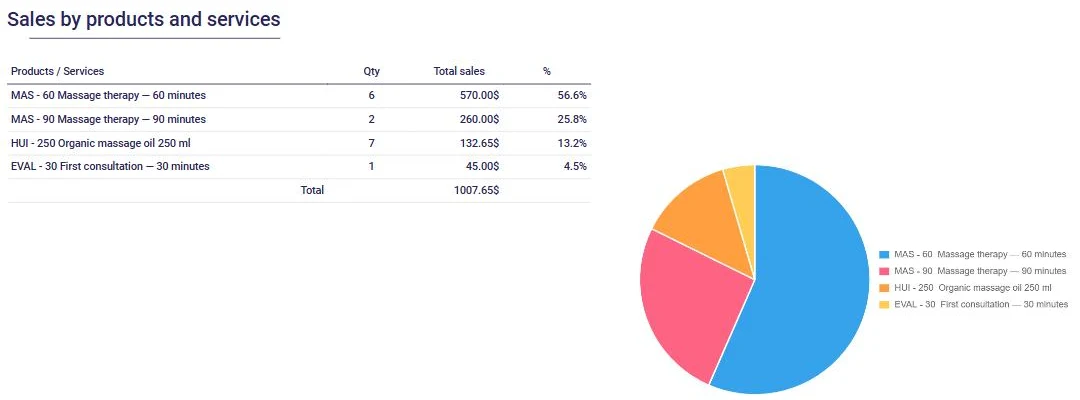
- Revenue sources: your sales by product and service, by client and by month, with charts.
- Detailed sales list: each of your sales, line by line, with the taxes and the payment type.
- Commissions: if several people make sales in your account, the commissions to pay each of them based on their sales.
- Dashboard - Subscriptions: if you sell subscriptions to your clients, your monthly and annual recurring revenue, the new subscriptions and cancellations for the period, the balances owing and the upcoming due dates.
Here, for example, is the Revenue sources report of a massage therapy clinic for one quarter:
The tax report
If you collect GST and QST, the Taxes section gives you access to the Tax report: the amounts to enter on your tax returns for the chosen period. Read our article Manage your taxes in AssisTime in 5 easy steps for all the details.
How to generate the reports
All the reports work the same way: choose the date or the period, then click Generate the report. The button at the top right of the report lets you save it as a PDF, for example to send it to your accountant.

Making decisions easier
With AssisTime reports, you can access your numbers easily and in real time, so you can make sound financial decisions for your business!